OpenAI Ads Manager: A Guide to Your First ChatGPT Campaign
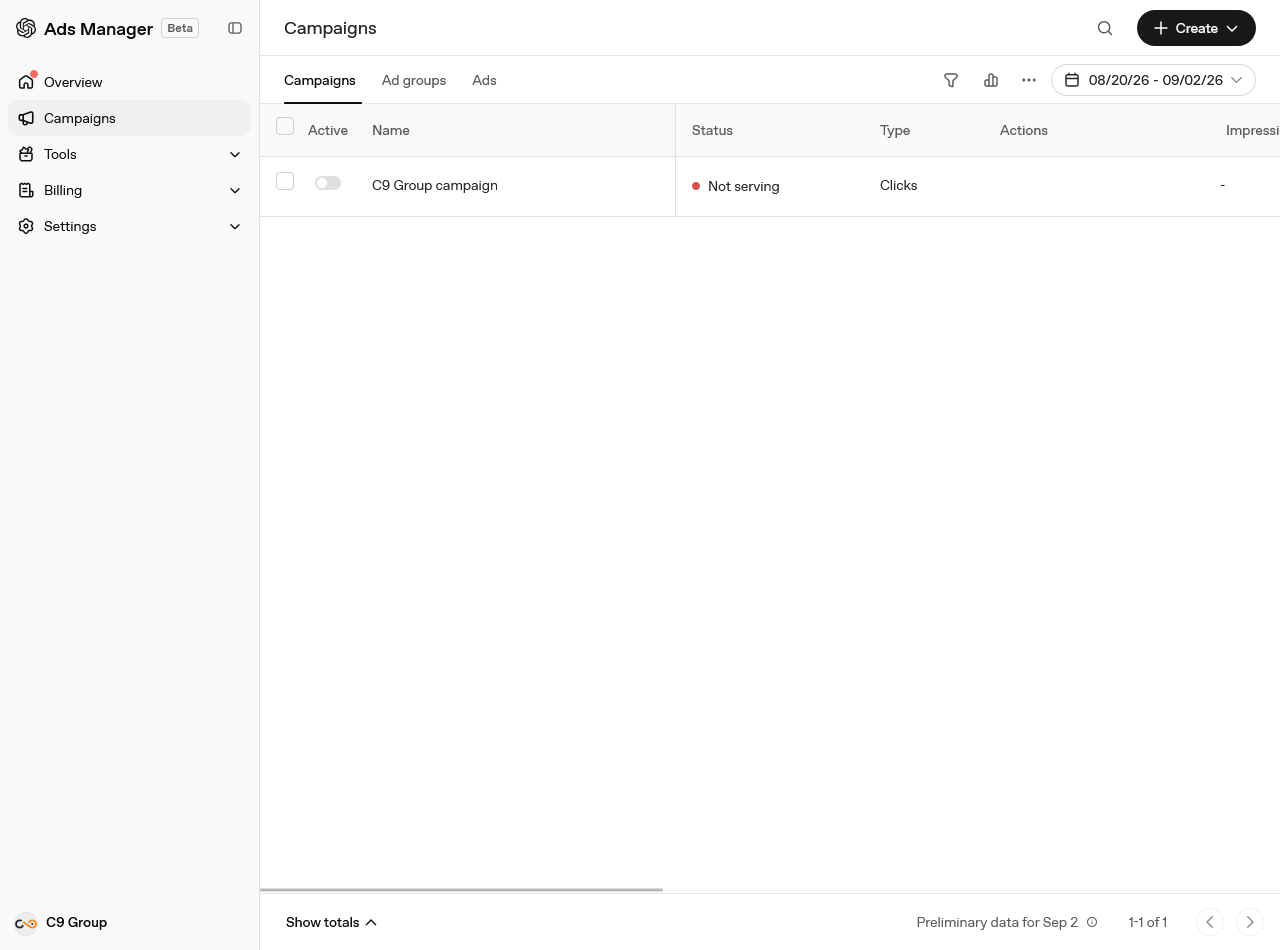
OpenAI started testing ads inside ChatGPT in the US on 9 February 2026. After a closed pilot that ran from February to April, the platform opened up for self-service signup at ads.openai.com. The availability list now shows more than 60 countries, including most of Europe, the UK, Japan, Korea, India, Brazil and several Gulf states. Ads then started rolling out in six Southeast Asian markets and Taiwan around late September.
The screenshots below are from our own advertiser account. Every screen is as shown at the start of September 2026 in Ads Manager Beta. The product changes quickly, so think of this layout as a snapshot and the Help Center as your main reference. We last checked everything against OpenAI's documentation on 10 October 2026. Some things changed within five weeks, and we note those changes where they appear.
What you are actually buying
Ads appear below the end of a ChatGPT response, labelled as sponsored and visually separated from the answer. An ad unit includes an advertiser name, a favicon, a headline, a description, a landing page and an optional square image. There is no keyword list. On 5 October 2026 OpenAI announced a second, visual format shown during image generation, to be tested from later in October with a first group of advertisers, in the United States only.
Who sees them matters for anyone estimating reach:
- Only Free and Go users. Plus, Pro, Business, Enterprise and Edu accounts have no ads.
- No ads to accounts identified as belonging to people under 18.
- No ads in Temporary Chats, and none in the ChatGPT Atlas browser during the test.
- No ads near sensitive or regulated content, including personal health, mental health and politics. Political advertising is not allowed at all.
Personalised ads are not available in the European Economic Area or Switzerland at launch, which is why custom audiences are blocked for campaigns targeting those locations. If you sell into Germany or Estonia, plan around the conversation you see, not around an audience list.
Selection uses a relevance-weighted second-price auction. Signals include the context and intent of the current conversation, your landing page, your headline and copy, and the context hints you write at ad group level.
Step 1: Set up the account before you set up a campaign
Sign in at ads.openai.com with a work email, add your brand logo in Settings, create a billing profile and add a card, then complete verification.
Three fields cannot be changed afterwards: country or region, billing currency and time zone. Getting one wrong means creating a second advertiser account, and each account needs a different email address. Billing is postpay: spend builds up, and your card is charged when the account hits an assigned payment threshold. When you add the card, your bank may show a temporary $100 authorisation that is released after verification.
One more thing to check before you spend anything. Your landing pages must be reachable by OpenAI's crawlers. If robots.txt blocks OAI-AdsBot or OAI-SearchBot, the ad has nothing to read and delivery suffers.
Step 2: Read the Overview screen
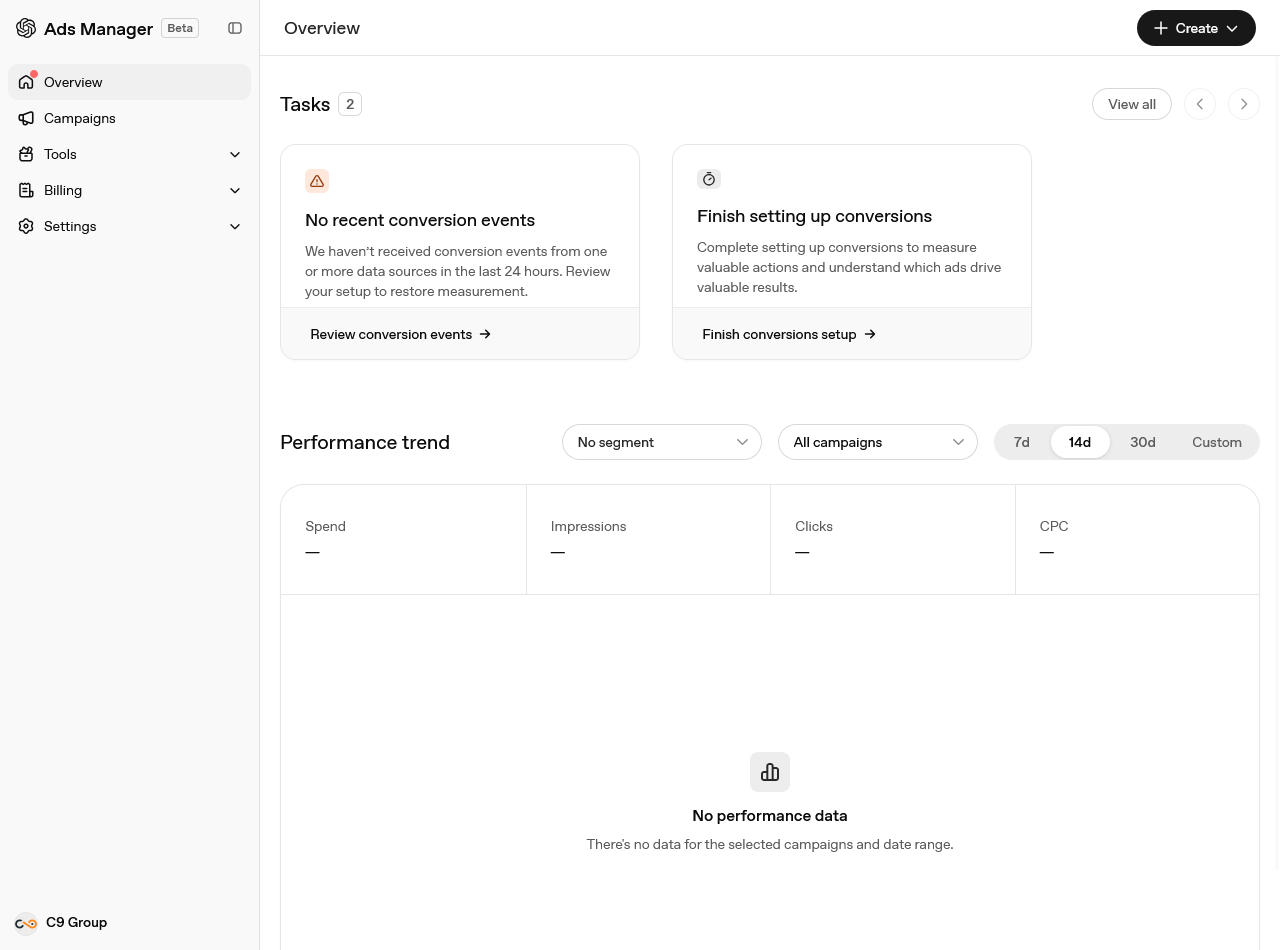
Overview shows a task list and a performance chart. Spend, impressions, clicks, and CPC appear at the top for the selected window. The Tasks cards flag incomplete setup. On a new account, you'll see what we saw: no conversion events received, conversions setup unfinished.
That's the right order of work. Conversion measurement is not something to add after the first week of spend, because it decides which objectives you can even choose.
Step 3: Create a data source and a conversion event
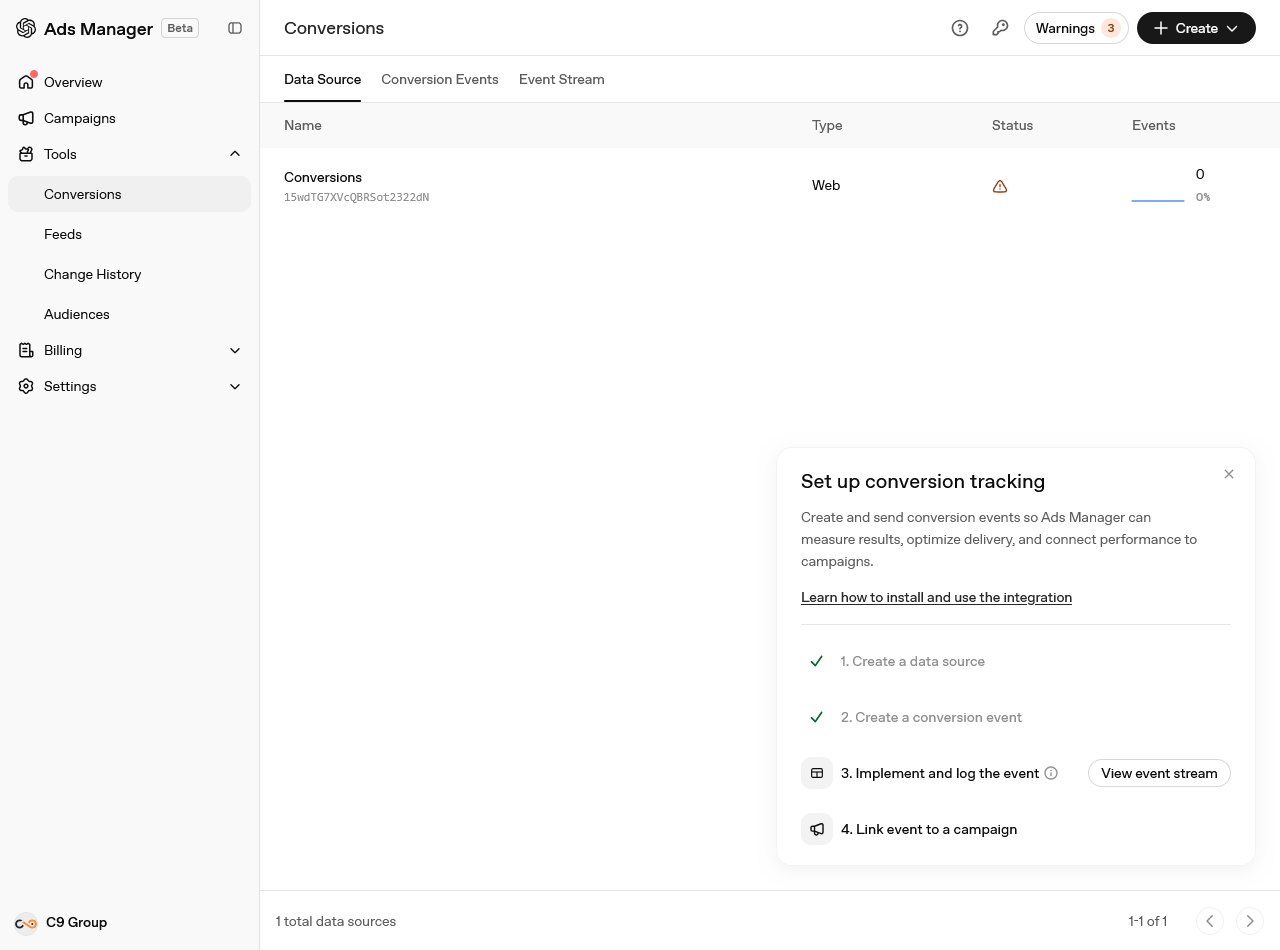
Tools, then Conversions. The setup panel walks four steps: create a data source, create a conversion event, implement and log the event, then link the event to a campaign. The Event Stream tab is where you confirm events are arriving.
You can send events two ways, and using both is the recommended setup:
- The OpenAI Pixel. A browser SDK. You add a script to the
<head>of every page you want to measure, initialise it with your Pixel ID, then calloaiq("measure", ...)when the action happens. It has a consent function: calloaiq("consent", false)before init, andoaiq("consent", true)only after the visitor grants consent. While consent is false, the pixel sends nothing, and blocked events are not replayed later. - The Conversions API. Server to server, for the events your server knows about and the browser does not.
If you send the same conversion both ways, give it the same event ID so OpenAI can deduplicate it. Sites with a strict Content Security Policy need https://bzrcdn.openai.com in script-src, and https://bzr.openai.com in connect-src and img-src.
Attribution runs on a click reference called oppref, appended to your landing page URL. The pixel stores it in a first-party cookie. Preserve it through redirects, or you lose the connection between the click and the sale. Reported totals may also include modelled conversions, which is one of several reasons OpenAI's numbers will not match your analytics tool exactly.
Step 4: Upload a product feed, if you sell products
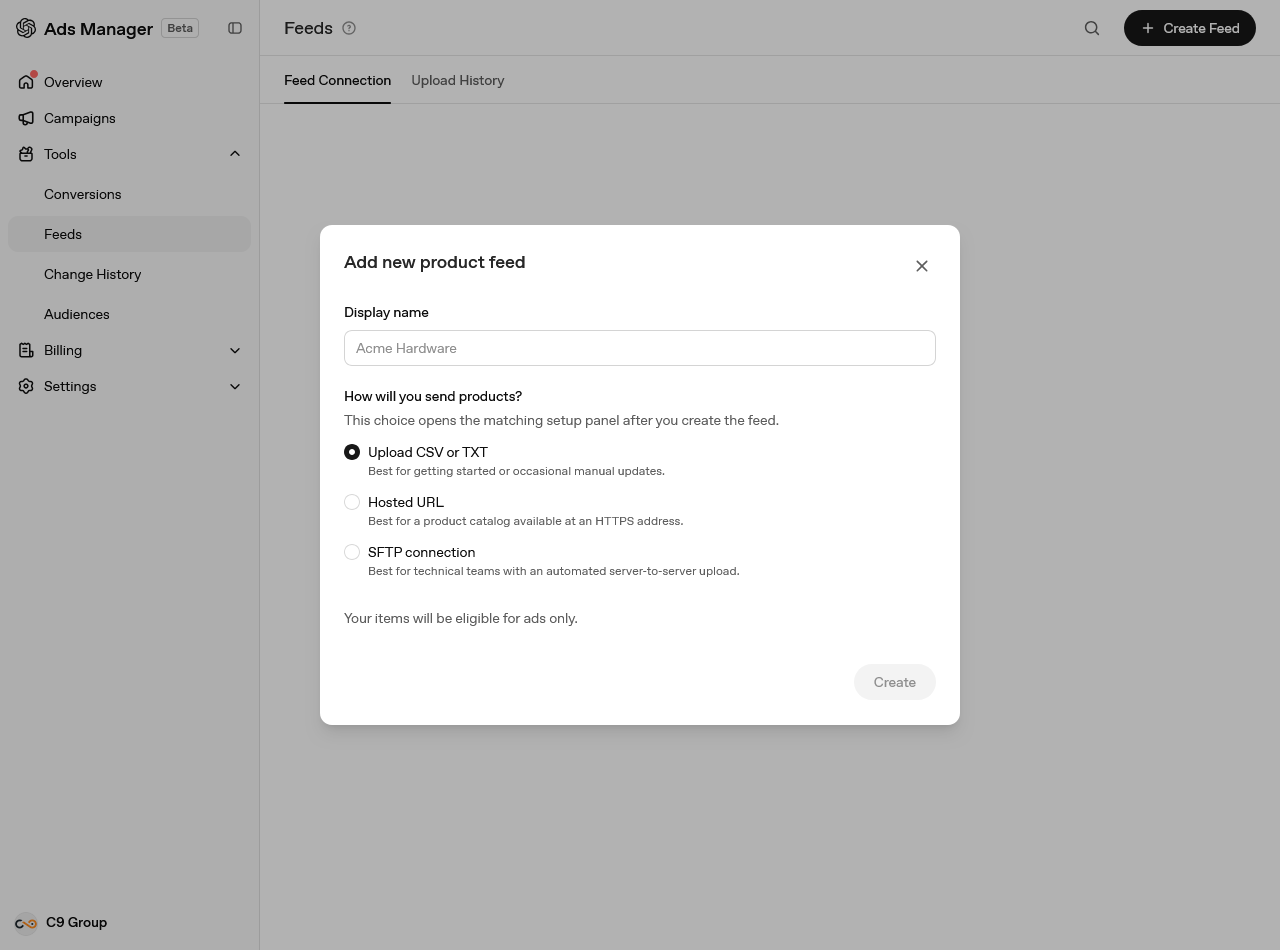
Retailers can skip hand-built ads. Tools then Feeds then Create Feed, name it, and choose how products arrive: a CSV or TXT upload for occasional manual updates, a hosted HTTPS URL, or an SFTP connection for automated server-to-server uploads.
Pick one of the last two if you can. Items expire after two weeks, so a manual CSV is a recurring chore rather than a one-off. Feed items are eligible for ads only during the beta and do not appear in ordinary ChatGPT conversations. Processing takes minutes to hours depending on feed size, and Upload History carries the errors.
Feed-based campaigns then use a different campaign type and an ad template rather than individual ads, with product filters deciding which items an ad group can serve.
Step 5: Create the campaign
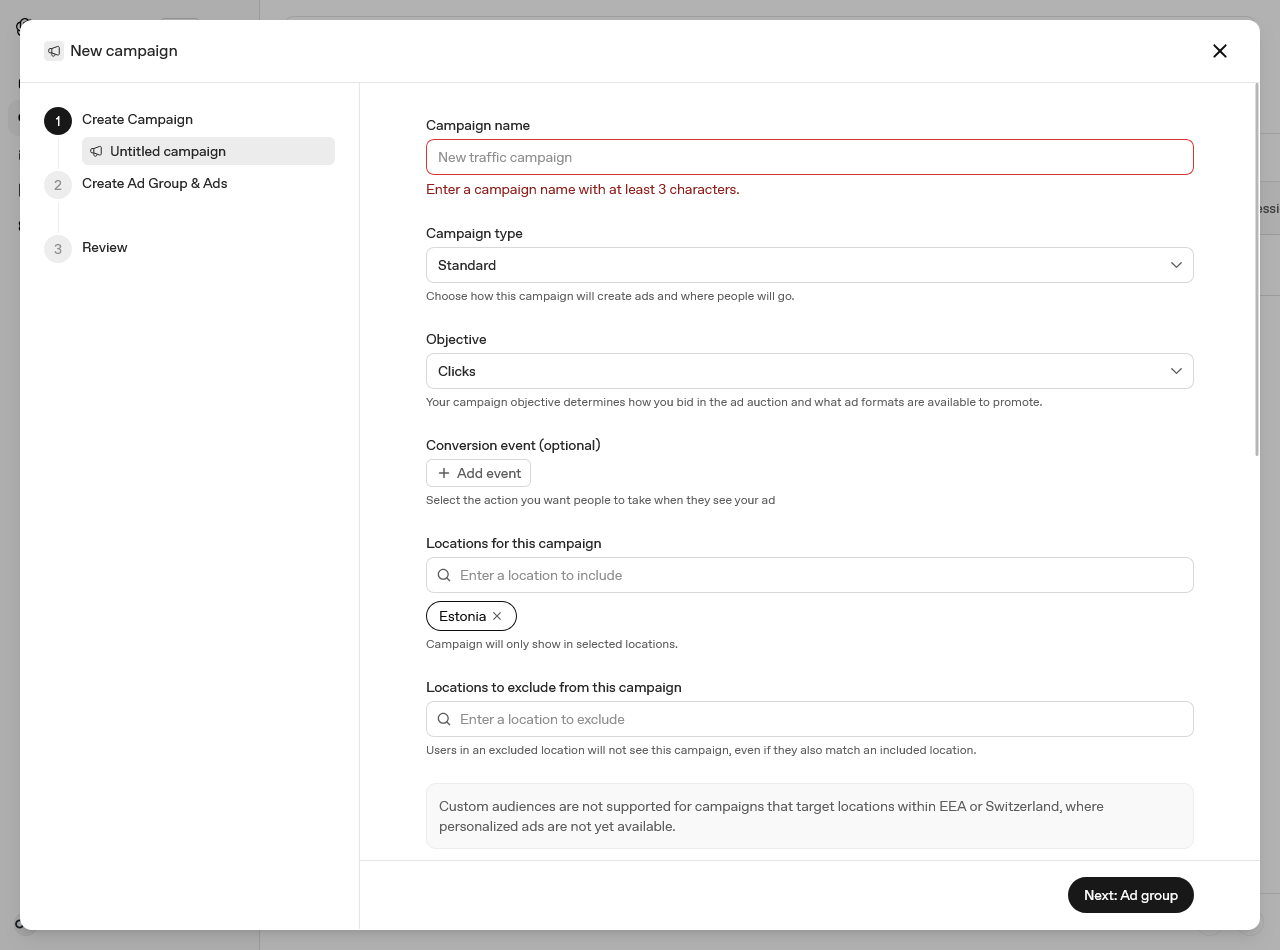
Create, then Create campaign. The campaign level holds the objective, the budget, the dates and the targeting.
The objective is the decision you cannot undo. It sets both pricing and optimisation, and it cannot be edited afterwards:
| Objective | You pay for | Use it for |
|---|---|---|
| Reach (CPM) | 1,000 impressions | Visibility and awareness |
| Clicks (CPC) | Each valid click | Traffic to a page |
| Conversions (oCPC; oCPM for eligible accounts) | Each valid click, or 1,000 impressions on oCPM, optimised toward a conversion event | A tracked action after the click |
Conversions campaigns need a working data source and one supported standard conversion event, chosen at creation and fixed from then on. Custom events are not supported for oCPC yet. Existing Reach or Clicks campaigns cannot be converted, so the choice here is really a choice about which campaign you will still be running in a month.
Targeting is country level, and in the United States also state, DMA and postal code. The location picker tells you what is supported, and OpenAI publishes the full location catalogue as a CSV.
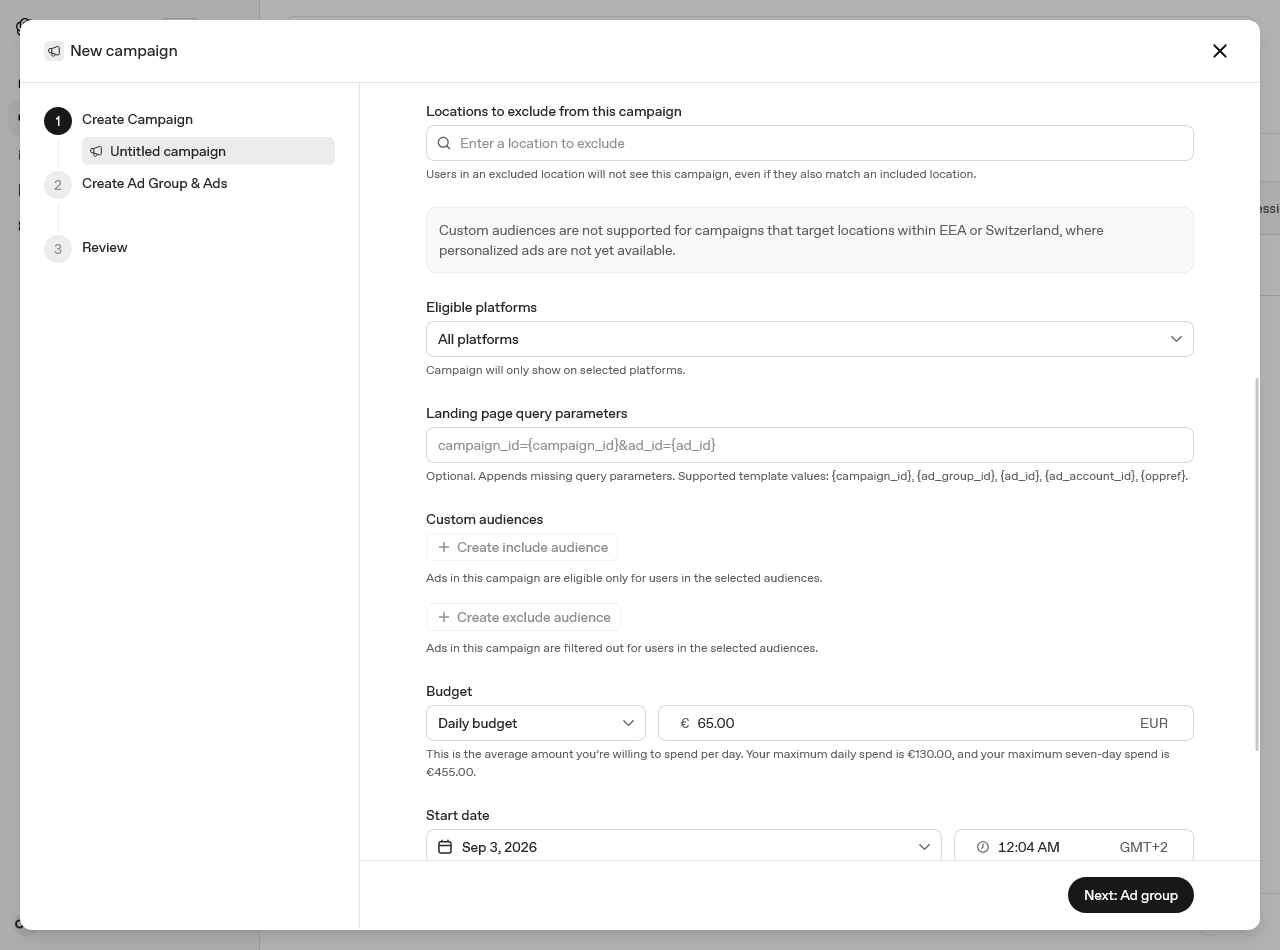
Eligible platforms restricts delivery to iOS App, Android App or Web, where Web covers desktop and mobile browsers. Since 10 September 2026 Web can also be narrowed to desktop, iOS or Android browsers, and reporting splits delivery the same way into five platforms. Web results from before the change stay in one combined row.
Landing page query parameters append tracking values to every destination URL in the campaign. Supported templates are {campaign_id}, {ad_group_id}, {ad_id}, {ad_account_id} and {oppref}. This is where your UTM scheme goes, so ChatGPT traffic is separable in your own analytics rather than arriving as unattributed referral traffic.
Custom audiences take an uploaded list of emails, phone numbers, SHA-256 hashes of either, or Google Advertising IDs. Inclusion targeting and ad group bid multipliers need at least 25,000 matched users, and OpenAI recommends 100,000. Exclusions have no minimum: since late August 2026 a small or even empty audience can be used to exclude. As the notice in the dialog says, none of it applies to campaigns targeting the EEA or Switzerland.
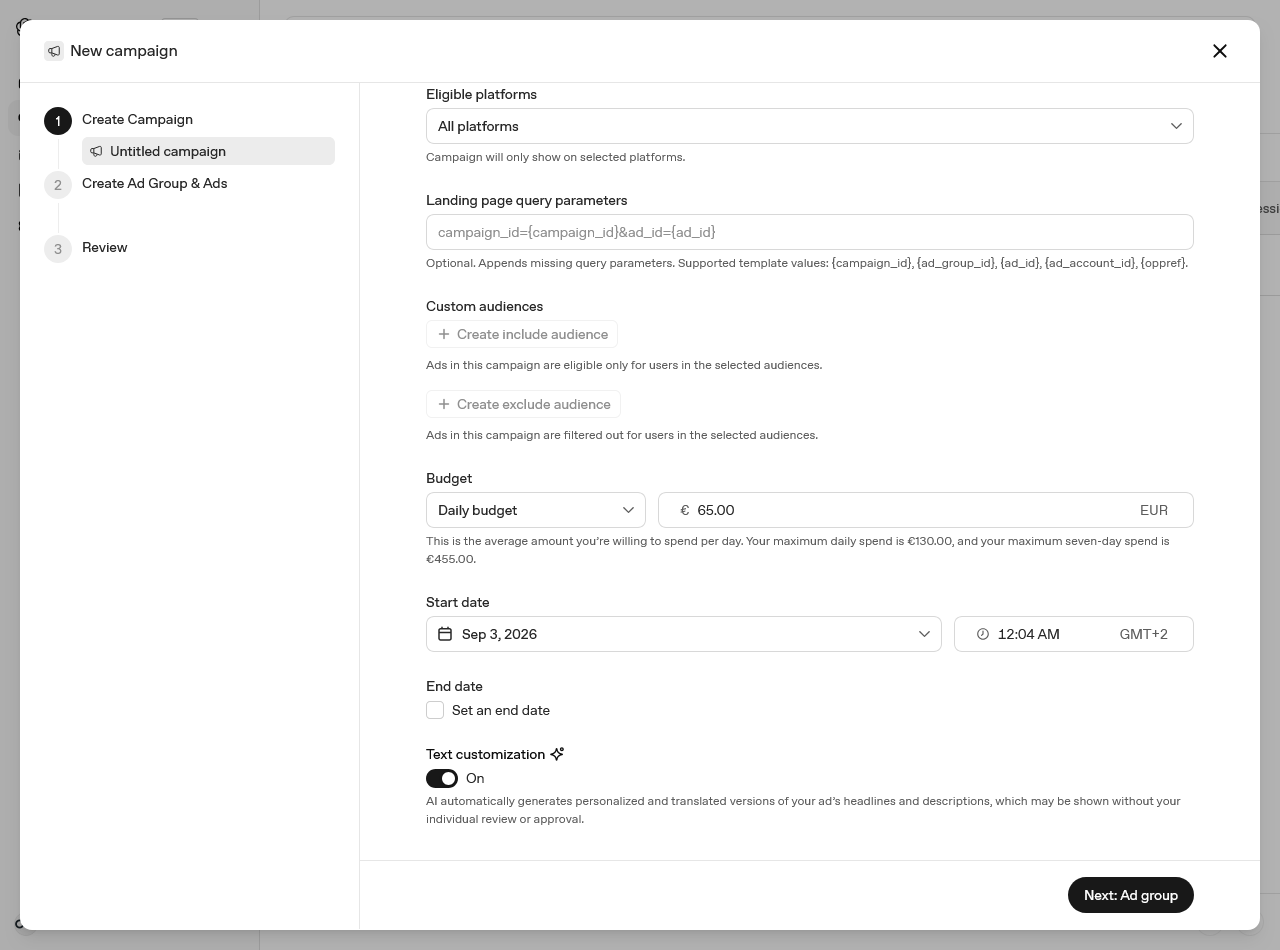
Budget. A daily budget is an average over a seven-day period, not a daily cap. Actual spend can reach twice the daily figure on one day, and will not exceed seven times it across the period. Our €65 daily budget shows a €130 maximum day and a €455 maximum week, which is exactly that arithmetic. A campaign-total budget is the stricter control. You can change the amount later but not the type, and a total budget switched to daily cannot be switched back. Minimum daily budgets are set per currency: $25 in the US, £15 in the UK, ¥2,500 in Japan, ₹725 in India.
Text customization was on by default when we took these screenshots. In mid-September 2026 OpenAI described it as opt-in, so check the toggle rather than assume either state. The label is worth reading twice: AI generates personalised and translated versions of your headlines and descriptions, which may be shown without your individual review or approval. For a regulated claim, a trademarked phrase, or a market where your legal copy is fixed, leave it off. For everything else it is free coverage across languages you did not write.
Step 6: Build the ad group and write context hints
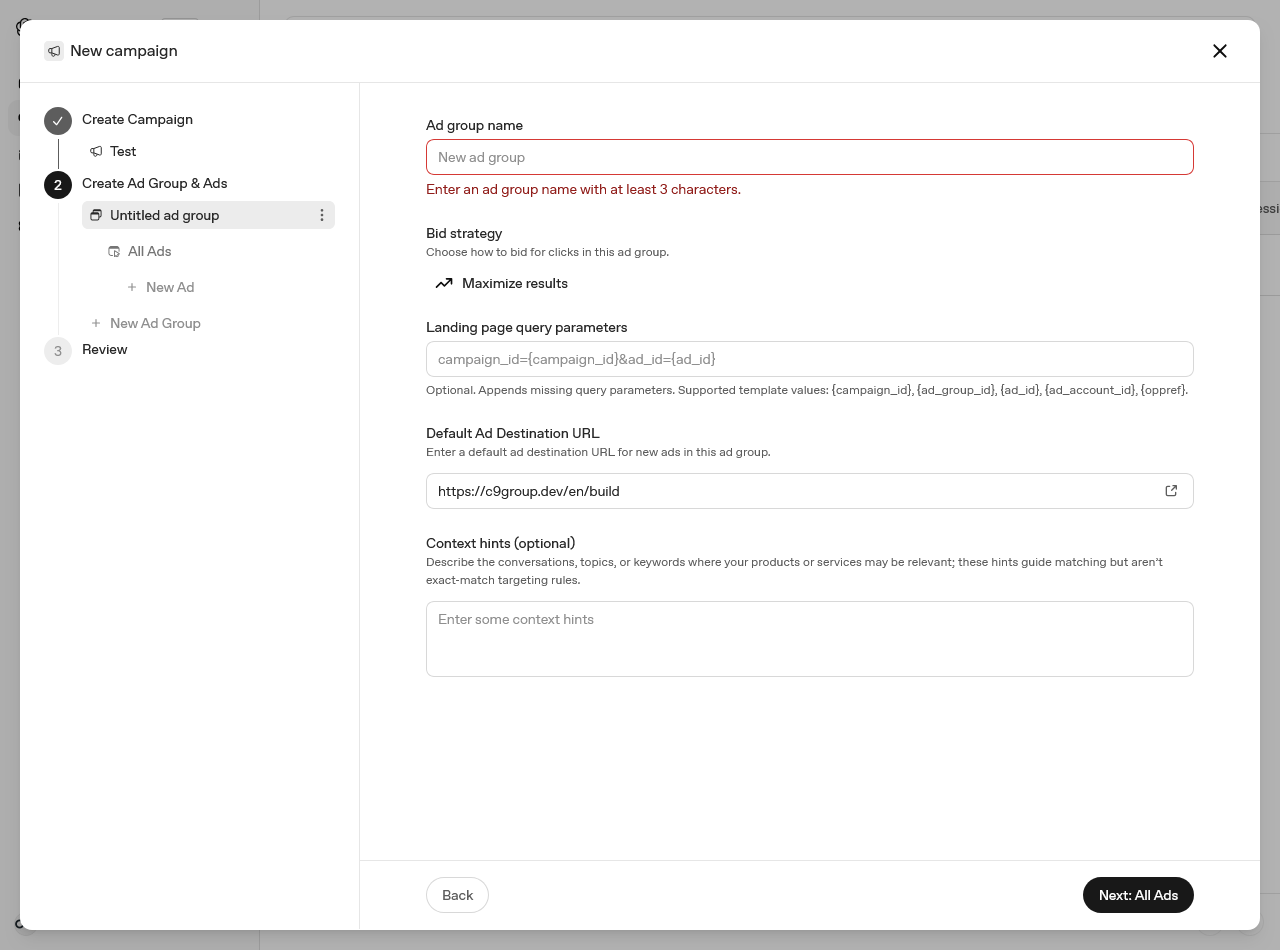
The ad group holds the bid, the default destination URL and the context hints.
Bid strategy defaults to Maximize results, which sets and adjusts bids automatically toward the campaign goal within the budget. It optimises for volume and does not promise a CPA or CPC target. Choose Manual: Max bid when you need a ceiling. For manual CPC campaigns, OpenAI suggests starting between $3 and $5 per click; for oCPC the Bid Cap is a conversion-oriented number and there is no recommended figure yet.
Context hints replace keywords and behave nothing like them. They describe the conversations, topics and needs where your offer is relevant, and they guide matching without being exact-match rules. The Help Center's own example is the useful one: not "running shoes" but "cushioned everyday running shoes for beginners training for their first 5K". Write what the product is, who it helps and when it is useful. Keep one theme per ad group, and split anything that would need different copy or a different landing page.
Step 7: Write the ads
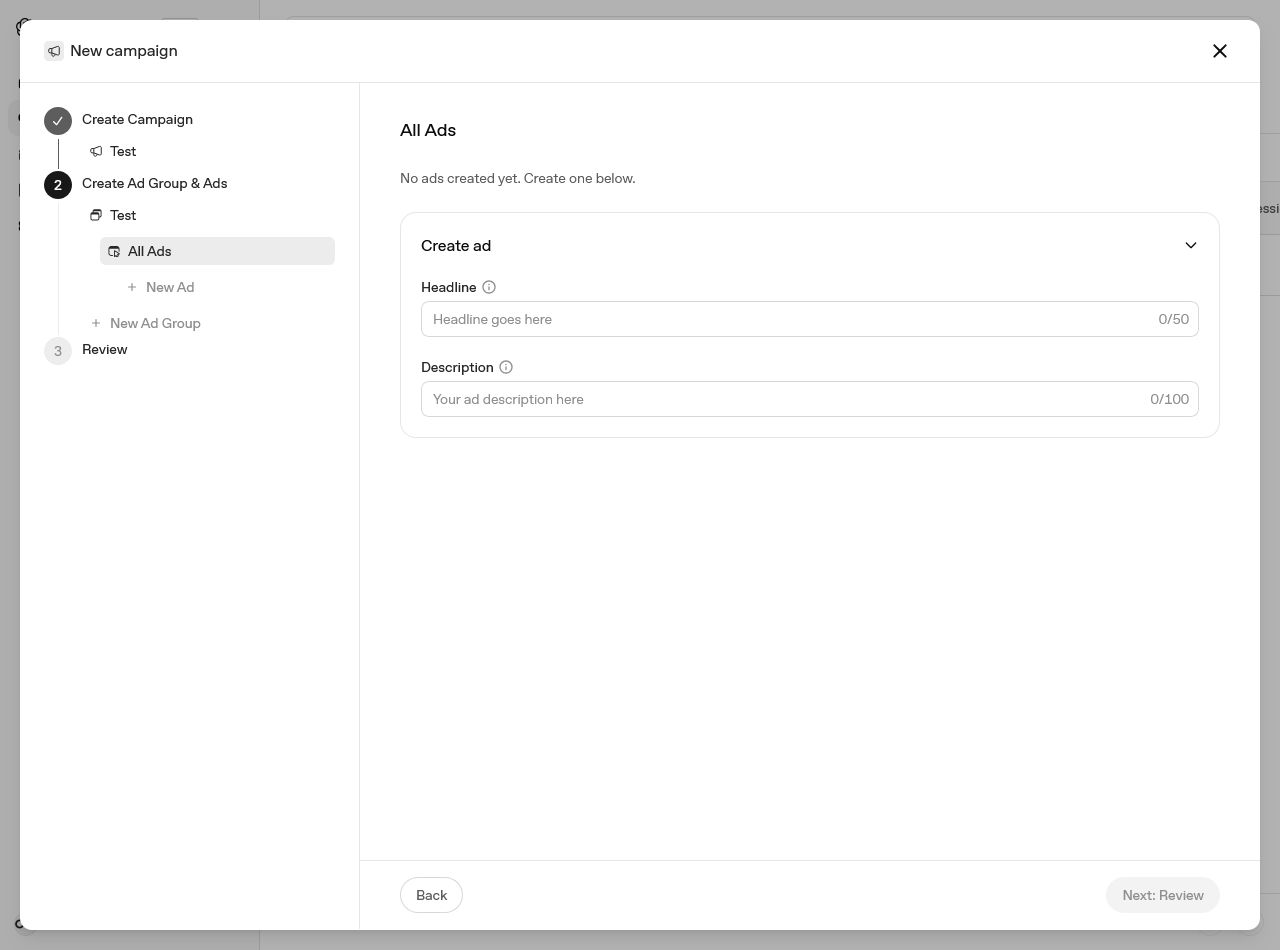
The ad is a headline of up to 50 characters and a description of up to 100, plus a landing page and an optional image. OpenAI recommends far less than the maximum: 16 to 24 characters for the headline, 32 to 48 for the description. Images must be PNG or JPG, square, no larger than 1200 by 1200, and publicly accessible.
Write several ads per group and make each one a different angle rather than the same sentence reworded. The system needs variety to find matches, and a description that repeats the headline wastes the only other line you get. Link to the page that answers the ad, not the homepage.
Account ceilings are 5,000 campaigns, 5,000 ad groups and 5,000 ads.
Step 8: Launch, then wait properly
Ads go through review before they serve. After launch, expect impressions and clicks within 24 hours, and expect reporting to lag delivery by up to seven hours. Do not judge anything on the first afternoon.
If a row says Not serving, as ours does in the screenshot at the top of this article, hover the status for the reason. The usual causes are ads still in review, incomplete account verification, a campaign budget already spent, an end date in the past, or a billing problem. Reporting covers impressions, clicks, spend, CTR, average CPC, average CPM and conversions, in a table, a chart, or a CSV export. Since late September 2026 you can choose the attribution window behind the conversion figures: 7, 14 or 30 days after a click, and zero or one day after a view. The default is 30-day click and 1-day view, and Ads Manager reports view-through conversions as a separate metric.
One caveat on pausing: campaign changes take time to propagate, ads can keep appearing for up to 24 hours, and that spend is billable.
What this is worth right now
ChatGPT Ads has no published benchmarks. OpenAI says so directly, and any agency quoting you a ChatGPT CPA in September 2026 is quoting a sample of one. The honest position is that this is a cheap, early auction with an unusual matching model, in a place where a large number of buying decisions now start.
Two things make the difference between a useful test and a wasted one. Set up conversion measurement before the first campaign, not after. And write context hints as if you were describing your customer's problem to a colleague, because that is much closer to what the system is reading than a keyword list.
If you want the measurement side handled properly, including the pixel, the Conversions API and the consent gate that keeps both lawful in the EU, get in touch.
Advertising
New guides and rule changes by email
When a rule changes, a deadline moves or we publish a new guide, we send it by email.